Start Your Book Printing Project
Share a few details about your book. JetPrint will review your specifications and help you identify the suitable printing, paper, binding, and finishing options for your project.

Reprints drift quietly.
A publisher sends an old PDF, writes “same as last time” in an email, approves a price, and assumes the second run will reproduce the first edition almost mechanically; meanwhile the available paper may have changed, the page count may have shifted by four pages, the binding line may be different, and somebody has quietly exported a new cover from an old InDesign file.
Then the cartons arrive.
Why gamble on memory?
For professional book printing, I treat a reprint as a controlled manufacturing job, not a photocopy of the previous purchase order. The old edition is evidence. It is not the specification.
That distinction matters financially. U.S. Census Bureau data put 2024 revenue for the American book printing industry at about $3.777 billion, while U.S. book publishers reported roughly $29.726 billion in revenue. Reprint control is therefore not an obscure production concern; it sits inside a substantial commercial supply chain. U.S. Census Bureau book printing data U.S. Census Bureau book publishing data
And the technical standard is equally clear. ISO/TC 130’s January 2024 guidance treats the print buyer as responsible for communicating specifications and approving proofs, OK samples and finished work, while prepress is expected to preserve data integrity and supply verified press-ready data. “Repeat order” is not a production standard. ISO/TC 130 Guidelines for Using Print Production Standards
If the goal is a genuinely repeatable edition, this is the book reprint checklist I would put between the previous copy and the new purchase order.
| # | Specification to Recheck | Compare Against | What Can Go Wrong |
|---|---|---|---|
| 1 | Edition and version identity | Previous approved edition, ISBN, copyright page | Wrong manuscript or cover version |
| 2 | Finished trim size | Physical sample and approved specification | Different dimensions, cover misfit |
| 3 | Final page count and pagination | Old book and new PDF | Wrong spine, missing/extra pages |
| 4 | Bleed, safe area and gutter | Printer template and final PDF | White edges, clipped text, buried content |
| 5 | Spine width and full-cover geometry | Final paper + page count + binding | Spine text shifts or wraps misalign |
| 6 | Interior paper specification | Mill/grade, GSM, caliper, shade, coating | Different thickness, opacity or feel |
| 7 | Paper grain direction | Binding requirement | Poor opening, curl, stressed spine |
| 8 | Cover, board and endpaper materials | Previous physical sample/spec sheet | Different stiffness or appearance |
| 9 | Printing process | Offset/digital and intended press condition | Visible color and screening changes |
| 10 | Color space and ICC profile | Previous approved workflow | Color shift between editions |
| 11 | Spot colors, black builds and overprints | Preflight report | Registration problems or wrong brand colors |
| 12 | Image resolution and cropping | Final placed images | Soft images or accidental crop changes |
| 13 | Fonts, transparency and linked assets | Packaged source/preflight | Font substitution or missing graphics |
| 14 | PDF/X export and file version | Approved print-ready book files | Printer outputs the wrong or unstable file |
| 15 | Binding construction | Sewn, PUR, EVA, casebound, perfect bound | Different opening behavior or durability |
| 16 | Lamination and surface finishing | Film type, foil, UV, emboss/deboss | Finish looks or performs differently |
| 17 | Inserts and special components | Endpapers, ribbons, gatefolds, tabs, jackets | Missing or misplaced components |
| 18 | Proof and approval reference | Contract proof, sample, previous run | Nobody knows what “match” means |
| 19 | Quantity and QC tolerance | PO, inspection criteria, approved quantity | Disputes over usable copies |
| 20 | Packing, labels and destination | Carton spec and delivery requirement | Damage, mixed SKUs or fulfillment delays |
A useful supplier should be able to turn these variables into one coherent manufacturing record. JetPrint’s custom book printing specification workflow and broader book printing capabilities overview both take that approach: trim size, pagination, paper, spine, binding, finishing and approval references are connected rather than quoted as isolated options.

Start here.
The reprint needs a unique, unambiguous edition identity: title, SKU, language, ISBN where applicable, revision date, interior filename, cover filename and approval status.
Do not accept:
Book_Final.pdf
And definitely do not accept:
Book_Final_NEW_v7-revised-FINAL2.pdf
Use controlled names such as:
Title_US_EN_Interior_2026-09-18_APPROVED.pdf
The same discipline should cover the copyright page, publisher imprint, ISBN, barcode, edition statement and any changed contributor credits.
There is a legal reason not to treat this casually. The U.S. Copyright Office explains that copyright duration varies by work and authorship and that copyright generally exists automatically when qualifying work is fixed in a tangible form; its regulations also recognize reprints and later editions when addressing copyright documentation. Rights, notices and edition information should therefore be rechecked rather than inherited blindly from an old file. U.S. Copyright Office copyright guidance
Do not read the size from the filename.
Measure the approved book.
A nominal 6 × 9 inch book and a 152 × 229 mm book are close, but they are not identical. That difference can affect imposition, margins, cover geometry, die lines, jackets and shipping cartons.
For a paperback, confirm width × height after trimming.
For a hardcover, separate the text-block trim size from the finished case dimensions. They are not the same object.
Four pages matter.
Adding or deleting even a single signature can change book-block thickness, spine width, binding behavior, paper consumption and freight weight.
Recheck:
front matter, Roman numerals, intentional blank pages, chapter starts, inserts, advertisements, indexes and end matter.
Odd-numbered pages normally appear on the reader’s right and even-numbered pages on the left. An accidental deletion can shift every following spread without triggering an obvious spelling error.
That is why prepress review cannot substitute for editorial approval.
The University of Delaware’s printing guidance recommends 1/8 inch bleed, equivalent to 0.125 inch or 3.175 mm, for artwork extending to the trimmed edge. It also recommends at least 300 dpi images and identifies CMYK as the preferred print color mode in its workflow. University of Delaware prepress layout guidance
But I would not turn 3.175 mm into a universal commandment. Your printer’s production template wins.
Gutter requirements also change with page count, paper bulk and binding. A 96-page paperback and a 640-page novel should not automatically use the same inner margin.
This is one of the most common repeat-order traps.
Spine width is an output of the book block. It is not a permanent design dimension.
A simplified concept is:
Spine width ≈ number of leaves × paper caliper
A 320-page book contains 160 leaves. At 0.10 mm caliper, the theoretical block contribution is around 16 mm. Change that paper to 0.12 mm, and the same 320 pages become about 19.2 mm before binding-specific allowances.
Same page count.
Different spine.
So the cover from the first printing should never be reused until the new paper and binding construction are confirmed. JetPrint’s own production guidance likewise states that spine width should follow the final page count, selected paper and binding structure rather than a provisional measurement.
“80 gsm offset paper” is not enough.
A professional book printing specification should identify as much of the following as the project requires:
paper manufacturer or approved equivalent, grade, basis weight/GSM, caliper, bulk, coated or uncoated surface, shade, opacity, brightness and certification requirement.
Two 80 gsm papers can produce visibly different books.
One may be thicker. One may show more text through the reverse side. One may be warmer. One may contain more optical brightening agents. One may fold and bind better.
Paper affects almost everything downstream: reading comfort, opacity, color, spine width, weight and opening behavior.
Grain direction rarely gets marketing attention.
It should.
For most conventionally bound books, paper grain should run parallel to the spine where the production method permits. Cross-grain paper resists folding and opening and can increase mechanical stress around the binding.
This becomes especially obvious in thicker books and coated stocks.
If a printer proposes changing sheet size or imposition on a reprint, ask whether that also changes grain direction.
For a paperback, specify cover paper or board weight, caliper and surface treatment.
For a hardcover, “hardcover” is nowhere near enough information.
A casebound structure can include cover boards, a spine inlay, printed paper or cloth wrap, endpapers, spine lining, headbands, ribbon markers and other components. The site’s detailed case binding components guide is useful here because it separates the visible case from the underlying book block and attachment structure.
If the old hardcover feels right, keep a signed physical sample.
Measurements alone do not capture hand feel.
A file can be identical while the output changes.
Offset lithography and digital printing use different imaging systems, screening behavior, inks or toners, substrates and process controls. A publisher moving a title from 200 digital copies to 5,000 offset copies should not assume the two production routes will be visually interchangeable.
ISO/TC 130 specifically links the final print condition with prepress preparation and proofing. It also lists offset publishing applications—including picture books, paperbacks and textbooks—within process-controlled graphic production.
The relevant question is not “Which process is better?”
It is: Which process is this edition approved for?
Color management is not just “convert everything to CMYK.”
That advice is too crude for modern workflows.
ISO guidance allows multiple controlled color workflows, including CMYK and properly managed RGB, provided profiles, rendering intent and printing conditions are defined. For offset work, ISO/TC 130 references ISO 12647-2, ICC profiles and PDF/X data exchange; its guidance also references characterization conditions including FOGRA39 and GRACoL2006_Coated1v2 in proofing contexts.
So record the actual workflow.
If Edition One was approved under one output profile and Edition Two is silently converted under another, “same files” does not mean same color.
Open the separations preview.
Seriously.
Confirm every Pantone or other spot-color plate that is supposed to exist—and every one that is not.
Body text is commonly produced using 100% K in four-color offset workflows because unnecessary C, M and Y components can increase registration sensitivity. Large black backgrounds may use a printer-approved rich-black build instead.
Do not invent one yourself.
A formula such as C60 M40 Y40 K100 may work in one production condition and be inappropriate in another because total ink coverage, paper and drying conditions differ.
Overprint settings deserve the same attention. A white object accidentally set to overprint can disappear.
A 300 dpi image placed at 100% scale is not equivalent to the same image enlarged to 200%.
Effective resolution matters.
For photographic images, 300 dpi at final reproduction size remains a common commercial benchmark and is explicitly recommended by the University of Delaware’s print guidance.
Also compare cropping.
A reprint can contain the same photograph and still be wrong because somebody moved the frame by 8 mm.
Never assume a PDF that looks correct on one laptop is technically complete.
Check:
embedded fonts, subset fonts where appropriate, missing links in source packages, transparency handling, placed PDF files, vector graphics, clipping paths and unwanted low-resolution proxies.
Fonts deserve particular care when the original source is several years old. Licensing changes, software updates and missing typefaces can alter line breaks—and one changed line can create a changed page.
ISO/TC 130’s 2024 guidance says artwork should preferably be supplied as PDF/X compliant with ISO 15930-7 or later in the cited workflow and explicitly recommends running preflight before submission. The same document says PDF/X helps reduce technical errors and misunderstandings when data moves between companies. ISO print-production file guidance
The Library of Congress likewise documents the PDF/X family as standards under ISO 15930, including PDF/X-1a and later color-managed formats. Library of Congress PDF/X format overview
My rule is simple: once the print-ready interior and cover are approved, freeze them.
No stealth corrections.
If one comma changes, issue a new revision number and restart the relevant approval check.
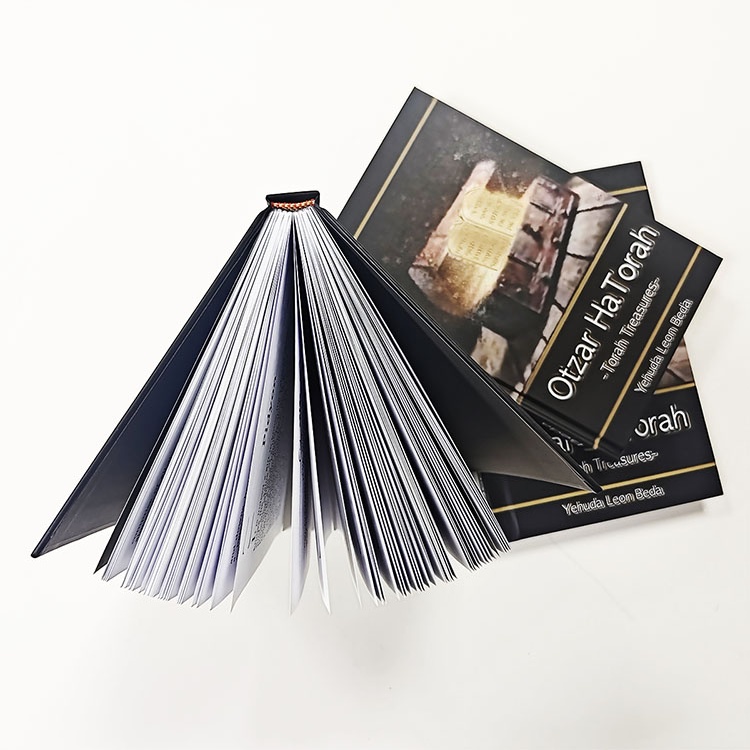
“Perfect bound” and “sewn hardcover” are starting points.
Not finished specifications.
For adhesive binding, ask whether the job uses EVA (ethylene-vinyl acetate), PUR (polyurethane reactive) or another approved system where that distinction affects the book.
For sewn books, confirm signature structure and sewing.
For hardcover books, confirm whether the book block is sewn, adhesively bound or uses another construction before casing-in.
The site’s comparison of sewn binding versus perfect binding makes a useful point: paper, grain direction, spine preparation and use conditions can matter as much as the marketing label attached to the binding.
A repeat order can therefore change dramatically when somebody replaces “sewn binding” with “similar binding.”
Delete the word “similar.”
“Matte lamination” is also incomplete.
Films vary.
Commercial lamination may use BOPP—biaxially oriented polypropylene, based on polypropylene (C₃H₆)n—but matte, anti-scuff matte, gloss and soft-touch constructions can produce different friction, gloss, fingerprint behavior and folding characteristics.
The site’s matte versus gloss lamination guide shows why this matters for dark solids, photography and additional foil or spot treatments.
For every decorative process, specify:
the finish type, artwork layer, exact location, dimensions, color/reference, relationship to folds or trim and approval method.
Foil that is “approximately centered” will eventually become a dispute.
Reprints lose small components surprisingly easily because the main PDF does not contain them.
Check:
endpapers, tip-ins, foldouts, gatefolds, perforated sheets, sticker sheets, belly bands, dust jackets, ribbons, elastic bands, pockets, tabs, headbands, colored edges, inserts and loose cards.
Create a bill of materials.
One line per component.
If the component is not written down, do not assume the production team knows it exists.
A proof should answer a question.
A soft PDF proof can verify pagination and content.
A calibrated contract proof can address color.
A blank dummy can answer thickness and opening questions.
A finished production sample can reveal binding and finishing.
These are not interchangeable.
ISO/TC 130 distinguishes ISO 12647-7 contract proofs, ISO 12647-8 validation prints, and color-managed soft-proofing workflows. It warns that a proof disconnected from the actual output condition may misrepresent the final appearance.
That matters enormously in a reprint.
Do not write “match previous edition” unless somebody has identified the actual previous edition sample, its condition and which attributes are expected to match.
Paper yellows. Covers fade. Lamination scratches.
Old books are evidence, but aging makes them imperfect color standards.
“Print 5,000 copies” sounds precise.
It may not be.
The purchase order should define the ordered quantity and how acceptable overs, unders, defective copies, replacements and inspection are handled.
Also define the defects that matter to your project.
Examples include:
missing pages, duplicate pages, inverted sections, loose leaves, excessive glue, incorrect trim, spine misalignment, foil displacement, lamination defects, crushed corners, color inconsistency and mixed versions.
Do not rely on “high quality.”
It cannot be measured.
A useful production framework is to compare finished books against approved files, materials, dimensions, construction and identified references—the same logic used in JetPrint’s book printing quality-control workflow.
Printing ends before the commercial risk does.
Confirm:
copies per carton, carton weight limit, inner protection, moisture protection where required, pallet requirements, carton markings, SKU labels, ISBN labels, destination, consignee details and any warehouse routing instructions.
Multi-title orders require special attention.
A perfect book placed in the wrong carton is still a failed order.
And if the reprint is being imported, do not wait until books are bound to decide whether the commercial arrangement is EXW, FOB, CIF, DAP or DDP. Packing dimensions and shipment planning affect landed economics long before the container leaves the factory.
Before I authorize production, I want one controlled sheet showing at least:
Title / SKU:
Edition / Revision:
ISBN / Barcode:
Finished Size:
Interior Page Count:
Interior Paper:
Interior Printing:
Cover Material:
Cover Printing:
Binding:
Spine Width:
Endpapers:
Lamination:
Foil / Emboss / Spot Finish:
Special Components:
Interior File Revision:
Cover File Revision:
Approved Proof / Sample:
Quantity:
Packing:
Delivery Destination:
Final Approval Date:
Approved By:
Specs beat memory.
And that is especially true when the first edition was successful. Success creates confidence, and confidence creates shortcuts.
The better approach is to treat the previous production run as a reference package: approved files, signed specification, physical samples, color references, production notes and known deviations. Then compare the proposed reprint against that package line by line.
If nothing changed, good.
Prove it.

Before reprinting a book, verify the exact edition, trim size, page count, bleed, gutter, spine width, paper, grain direction, print process, color profiles, image resolution, fonts, PDF/X files, binding, cover materials, finishing, special components, approved proof, order quantity, quality tolerances, packing and delivery instructions against the previous approved production specification.
Do not use the old quotation alone as your reference. Keep the previous physical book, approved PDFs and production specification together so changes in materials or manufacturing can be identified before the new run begins.
A book reprint needs verified print-ready files even when no editorial changes are planned, because the production team must confirm that the interior and cover versions are the approved editions, remain technically valid, match the current trim size and binding specification, and have not been altered, corrupted, re-exported or replaced since the previous printing.
If the existing files pass that review, there may be no reason to redesign them. But “we used this PDF three years ago” is not a preflight result.
Book printing bleed is the artwork area extending beyond the final trim so minor cutting variation does not leave an unintended white edge; 0.125 inch, or 3.175 mm, is a common recommendation for commercial documents, but the printer’s current template and production requirement should always determine the final bleed value for the specific book.
The University of Delaware recommends 1/8 inch bleed in its prepress guidance. Hardcover wraps, jackets, board books and special die-cut products may require substantially different extensions or wrap allowances.
Offset and digital printing are different production routes rather than universal quality rankings: offset commonly suits larger, stable runs with defined press conditions, while digital production can suit shorter quantities, rapid revisions and versioned work; the right reprint method depends on quantity, book format, paper, color expectations, binding, proofing requirements and the approved previous edition.
If the original edition was offset and the reprint moves to digital—or vice versa—approve that change consciously. Do not promise an invisible process change unless the actual output has been tested.
The same book file can print differently when the reprint changes paper shade or coating, press condition, ink or toner system, ICC profile, proofing reference, screening, lamination, finishing or color-management workflow, because the PDF supplies image data while the physical manufacturing system determines how that data is reproduced on a specific substrate under specific conditions.
ISO’s print-production guidance emphasizes exactly this relationship between digital files, printing conditions, profiles, proofs and process control.
A successful reprint begins before the press starts.
Send the printer the previous approved files, a physical reference copy when available, the revised specification, final quantity, delivery destination and a written list of anything that is allowed to change. Then ask the supplier to identify substitutions or conflicts before production approval.
If you are preparing a hardcover, paperback, illustrated title, manual, novel or other repeat book order, use JetPrint’s custom book printing project review to turn the 20 checks above into one quotation-ready specification, or send the book specifications directly to JetPrint for a project-specific review.
Do not approve “same as before.”
Approve the specification.

Leave Your Comments